The following instructions may help you manage your appointments.
Help cancel Booking
Booking Instructions Help and Frequently Asked Questions (FAQs)

Cancelling a Road Test Appointment
You can cancel most road test appointments online using your driver’s licence number and expiry date.
If you must cancel a road test appointment, please notify DriveTest at least 48 hours prior to your scheduled appointment time to avoid forfeiting your road test fee. You will lose your fee if you cancel within 48 hours of your appointment.
If your licence has expired, please note that you cannot cancel or change any road test appointments. Please call our comments and questions line.
To cancel your road test,
- Log in to your Dashboard to view your booked tests. See the “Booking a New Road Test” page for details on how to login
Your dashboard will display a summary of all your previously booked road tests, whether they were booked over the phone, at a DriveTest Centre, or using this website.
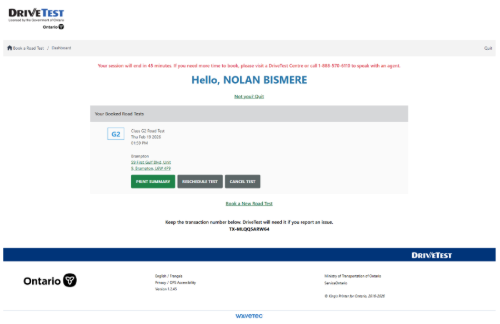
- If you would like to cancel a test, click the “Cancel Test” button beneath the box that contains the appointment you want to delete.
The Cancel Test confirmation window appears.
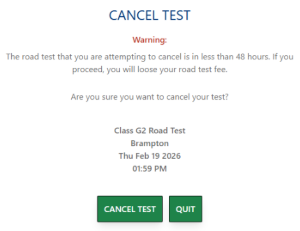
Select the “Cancel Test” button again to verify that you want to delete your appointment. If you are cancelling within 48 hours of your scheduled road test, you will forfeit your prepaid test fee.
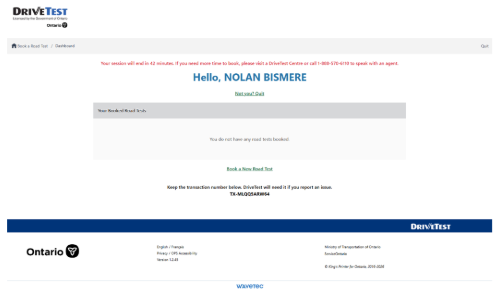
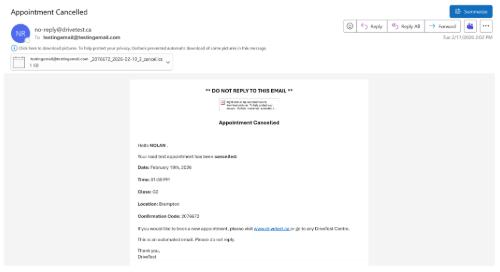
The online road test booking system will automatically send you a cancellation confirmation email to the email address you used to book the appointment.
- Print the appointment details/confirmation, if desired or select “Quit” in the top right corner of the browser tab to close your session.